An eWay Bill is an electronic document required for the movement of goods from one place to another. Under the GST system, it is mandatory when the value of goods exceeds ₹50,000. The bill is generated on the official EWay Bill Portal through Eway Bill Login and remains valid for a predefined duration based on the distance to be covered. Users can create it through various modes, including SMS, the mobile app, or API integration, allowing quick and hassle-free data submission. After generation, a unique e-Way Bill Number (EBN) is issued, which serves as a reference for the supplier, recipient, and transporter, facilitating easy tracking and ensuring compliance with GST rules.
What is an EWay Bill?
Under the GST framework, an Electronic Way Bill (e-Way Bill) is mandatory for transporting goods. A registered person cannot move goods worth more than ₹50,000 (as per a single invoice, bill, or delivery challan) without generating an eWay Bill on the official portal, ewaybillgst.gov.in.
The e-Way Bill can also be created or cancelled through SMS, the mobile app, or API integration, provided the correct GSTIN details of the involved parties are entered. Before generating or updating your bill through Eway Bill Login, it is advisable to verify the GSTIN using a GST search tool. Once the e-Way Bill is generated, a unique E-Way Bill Number (EBN) is issued, which becomes accessible to the supplier, recipient, and transporter for seamless tracking and compliance.
GST EWay Bill Login Process for New Users
After registering on the e-Way Bill portal, taxpayers can Login Eway Bill in using their User ID and password.
- Visit the official Website
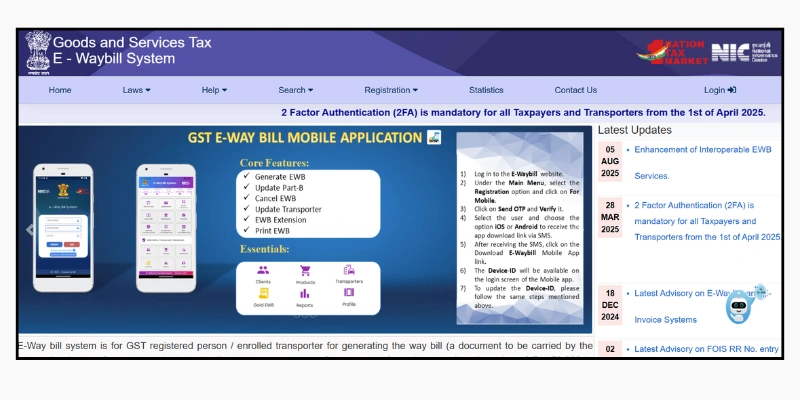
- Enter your User Name and Password. If you forget your login details, you can use the options ‘Forgot User ID’, ‘Forgot TransID’, or ‘Forgot Password’.
- Enter the valid Captcha code and click on Log In to access your account.
What are the Components of an EWay Bill?
The e-Way Bill consists of two main sections: Part A and Part B. The person responsible for generating the bill must complete the following details in Part A:
- Recipient’s GSTIN
- Place of delivery (PIN code)
- Invoice or challan number and date
- Value of goods
- HSN code
- Transport document number (such as Goods Receipt, Railway Receipt, Airway Bill, or Bill of Lading)
- Reason for transportation
Part B, on the other hand, contains the transporter’s information, including details like the vehicle number.
GST Eway Bill Registration for Taxpayers & Registered Transporters
As a taxpayer or registered transporter, understanding the e-way bill registration process is essential for smooth and compliant movement of goods across India. Follow the steps below to complete your registration:
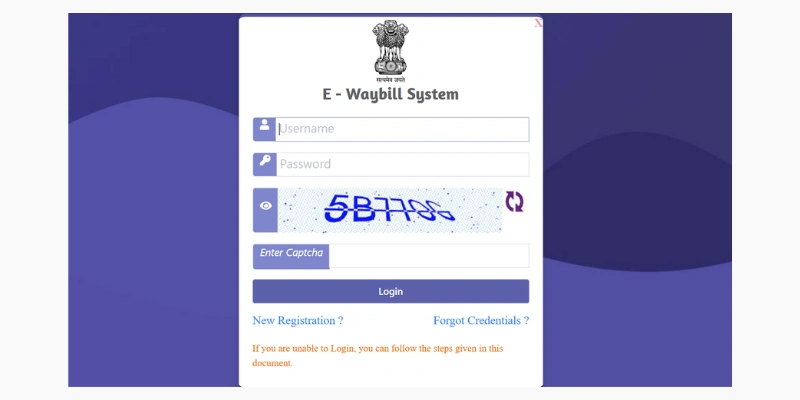
- Visit the official Website e-way bill portal . If a login pop-up appears, simply close it to continue.
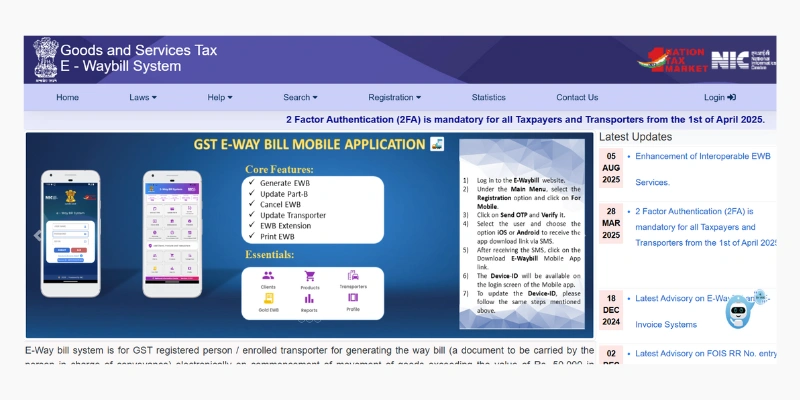
- On the homepage, go to the ‘Registration’ menu and select ‘Eway Bill Registration’.
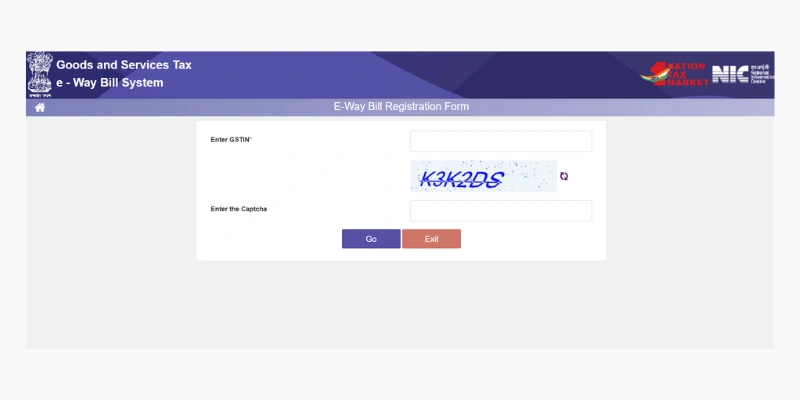
- Enter GSTIN and the displayed Captcha Code, then click ‘Go’.
- An OTP will be sent to your registered mobile number. Enter the OTP in the required field and click ‘Verify’.
- Once the OTP is verified, you will be asked to create a new user ID and password. These credentials will be used for future logins, so ensure they are accurate and secure.
| The portal auto-fills relevant details based on the GSTIN entered. If any information appears incorrect, it can be updated through the GST Portal. After successful OTP verification, your e-way bill login credentials will be created, completing the registration process. |
Objectives of the GST EWay Bill Portal
The eWay Bill Portal has been developed to streamline and enhance the movement of goods across India. Its main objectives include:
- Unified tracking: Establishing a single, standardised system for monitoring both inter-state and intra-state transportation of goods, ensuring uniform compliance nationwide.
- Paperless workflow: Digitising the entire process to eliminate physical documents, resulting in faster and smoother goods movement.
- Enhanced service efficiency: Speeding up supply chain operations by offering quick and easy access to required information and services from anywhere.
- Reduced manual interaction: Minimising direct contact with government offices, making the overall transportation process more convenient and efficient.
- Real-time monitoring: Allowing instant tracking of goods in transit, promoting transparency, and strengthening adherence to GST rules.
When should an e-Way bill be issued?
An e-Way Bill must be generated in certain situations based on the value of goods, the type of movement, and the GST Registration status of the parties involved. Below is a clear overview:
Mandatory Scenarios
An e-Way Bill is required in the following cases:
- When the value of goods exceeds ₹50,000, it applies to all registered suppliers, recipients, and transporters.
- When the supplier is unregistered but the recipient is registered, even if the consignment value is below ₹50,000.
- For goods specifically notified under the e-Way Bill rules, regardless of their value.
- For inter-state movement of goods, even if both parties are exempt from GST registration.
These requirements ensure proper tracking and adherence to GST rules during the movement of goods across India.
Optional Scenarios
- Registered persons may voluntarily generate an e-Way Bill for consignments valued at ₹50,000 or less.
- Unregistered persons may also generate an e-Way Bill voluntarily for easier record-keeping and smoother transportation.
Who Should Generate an GST eWay Bill?
- Registered Persons- An e-Way Bill must be generated when goods valued at more than ₹50,000 are moved to or from a registered person. However, both registered persons and transporters may voluntarily generate an e-Way Bill even for consignments valued below ₹50,000.
- Unregistered Persons- Unregistered individuals are also required to generate an e-Way Bill. If an unregistered supplier makes a supply to a registered buyer, the responsibility for compliance shifts to the recipient, who must fulfil all requirements as if they were the supplier.
- Transporters- Transporters moving goods by road, air, rail, or other modes must generate an e-Way Bill if the supplier has not already created one. However, they are not required to generate Form EWB-01 or EWB-02 if:
- Each consignment (based on a single document**) is valued at ₹50,000 or less, but
- The total value of all consignments in the vehicle combined exceeds ₹50,000.
Cases when the eWay bill is not required
There are several situations where an e-Way Bill is not required for the movement of goods within India. Below are the key exemptions:”
Exempted Goods
- Certain categories of goods do not require an e-Way Bill, such as:
- Specified goods listed in the e-Way Bill rules, including:
- Liquefied petroleum gas for domestic and exempted non-domestic use
- Alcoholic liquor for human consumption
- Petroleum products like crude oil, diesel, petrol, natural gas, and aviation turbine fuel
- Empty cargo containers
- Goods exempted through government notifications, as updated on the official e-Way Bill portal.
- Exempted Transactions
An e-Way Bill is also not required in the following cases:
- Consignment value below ₹50,000 when both the supplier and recipient are unregistered.
- Transport through non-motorised vehicles, such as handcarts or bicycles.
- Goods moved under customs supervision or customs seal.
- Transit cargo is transported to or from Nepal and Bhutan.
- Goods transported by rail when the consignor is the government or a local authority.
- Movement by the Ministry of Defence, where military formations transport goods.
- Short-distance weighbridge trips, where goods are moved up to 20 km to and from a weighbridge with a valid Delivery Challan (DC).
State-wise GST EWay Bill Portal Rules and Limits
Although the nationwide eWay Bill rule applies to interstate movement of goods valued above ₹50,000, each state sets its own limits and conditions for intra-state transportation. Below is a simplified overview:”
Threshold Limits
Most states mandate an e-Way Bill for intra-state movement of goods exceeding ₹1,00,000
(e.g., Andhra Pradesh, Bihar, Goa, Gujarat, and others).
Some states follow lower limits, such as:
- Karnataka: ₹50,000 for all taxable goods
- Delhi: ₹25,000 for select categories of goods
| State-specific exemptions may apply for certain goods or scenarios, even if the value crosses the threshold. Always refer to the latest state notifications. |
Additional Rules
- Distance-based provisions: A few states waive the e-Way Bill requirement for transportation within a short radius (e.g., within 10 km in some regions).
- Special categories of goods: States may impose unique rules for particular commodities regardless of value or distance.
- Job work movement: Some states have separate e-Way Bill guidelines when goods are sent for job work or processing by another unit.
How to Generate E-Way Bill on Portal
The e-Way Bill and its unique eWay Bill Number can be generated through e-Way Bill Portal 1 or the new e-Way Bill Portal (available from 1st July 2025). You simply need a valid E-Way Bill Portal login. For detailed instructions, you may refer to our complete step-by-step guide on generating an e-Way Bill online.
The GST Network issued an advisory on 17th December 2024 regarding the expanded implementation of two-factor authentication (2FA) on NIC systems for taxpayers. From 1st January 2025, 2FA becomes mandatory for enterprises with an Annual Aggregate Turnover (AATO) above ₹20 crore. For businesses with turnover between ₹5 crore and ₹20 crore, 2FA is compulsory from 1st February 2025. Beginning 1st April 2025, all taxpayers—regardless of turnover—must use 2FA for generating e-invoices and e-Way Bills.
SMS EWay Bill Generation on Mobile
You can generate e-Way Bills through SMS using your registered mobile number. To start, you must first activate the SMS facility for e-Way Bill generation and register the mobile number you intend to use. Once enabled, you can send specific SMS codes to the designated number provided by the e-Way Bill portal/GSTN to create, update, or cancel e-Way Bills. For detailed instructions, refer to our guide on generating e-Way Bills via SMS.
Validity of an GST EWay Bill
The validity of an e-Way Bill depends on the distance that the goods must travel. The validity period begins from the exact date and time the e-Way Bill is generated. The applicable validity durations are listed below.
| Type of Conveyance | Distance | Validity of EWB |
| Other than Over-Dimensional Cargo | Less than 200 km | 1 Day |
| For every additional 200 km or part thereof | Additional 1 Day | |
| Over-Dimensional Cargo | Less than 20 km | 1 Day |
| For every additional 20 km or part thereof | Additional 1 Day |
The validity of an e-Way Bill can be extended by the person who originally generated it. This extension may be requested either up to eight hours before the bill expires or within eight hours after its expiry.
Starting from 1st January 2025, the maximum allowable extension period for an e-Way Bill is capped at 360 days from the date it was originally generated.
Documents or Details Required to Generate EWay Bill
Basic Information Required:
- GSTIN of the supplier and recipient: The unique identification number assigned to registered taxpayers under the GST e-way bill system.
- Date of generation: The date on which the eWay Bill is created.
- Invoice or bill of supply number: The reference number of the invoice or bill connected to the goods being transported.
- HSN code of the goods: The Harmonized System of Nomenclature code used to classify the type of goods.
- Value of the goods: The declared value of the items being transported.
Transportation Details Required:
- Mode of transport: Whether the goods are being moved by road, rail, air, or ship.
- Transporter ID (if applicable): The registered transporter’s unique identification number.
- Vehicle number (if no transporter ID): The registration number of the vehicle transporting the goods.
- Transport document number and date: Required for rail, air, or ship transport, referring to the associated transport document and its date.
Step-by-Step Process to Cancel the GST Eway Bill
Here is the rewritten version:
- Access the e-Way Bill portal and sign in with your credentials.
- Go to the “e-Way Bill” section from the dashboard.
- Click on the “Cancel” option.
- Enter the eWay Bill (EBN) number you wish to cancel.
- Select or enter a valid reason for cancellation.
- Confirm your action and submit the request.
- After cancellation, the same EBN becomes invalid and cannot be reused.
E-Way Bill Generation Process
The e-Way Bill generation process plays a vital role in India’s Goods and Services Tax (GST) framework. For transporting goods valued above ₹50,000, whether inter-state or intra-state, generating an eWay Bill is mandatory. The process involves several steps, starting from registration on the e-Way Bill portal to creating and managing the bill. Below is a simplified overview of how to generate an e-Way Bill:
1. Register on the e-Way Bill Portal: Businesses involved in supplying or transporting goods must register on the official portal using their GSTIN. After registration, users can access features for generating, updating, and cancelling e-Way Bills.
2. Log in to the Portal: Once registered, taxpayers can log in using their credentials to access all e-Way Bill services.
3. Enter Consignment Details: Go to the ‘Generate e-Way Bill’ section and provide details such as invoice number and date, value of goods, HSN/SAC codes, recipient GSTIN, transporter information, and vehicle details.
4. Validate the Information: The Eway Bill Portal system verifies the entered details for accuracy and compliance. Any discrepancies must be corrected before proceeding.
5. Generate the e-Way Bill: After successful validation, a unique E-Way Bill Number (EBN) and a QR code are generated. This bill should be downloaded and kept with the goods during transportation.
6. Automatic Sharing: The generated e-Way Bill is automatically shared with the supplier, recipient, and transporter.
7. Update or Modify Details: Certain fields, such as the vehicle number or a change in transport route, can be updated within the allowed time frame.
8. Cancellation: If the goods are not transported or the transaction is cancelled, the e-Way Bill must be cancelled promptly to prevent penalties.
Overall, the e-Way Bill system ensures smooth tracking, compliance, and regulated movement of goods under India’s GST regime.
FAQ
What is an e-Way Bill GST?
An e-Way Bill is a digital document required for transporting goods valued above ₹50,000. It must be generated online by a GST-registered person or a transporter before the goods begin their journey.
Who is responsible for generating an e-Way Bill?
It can be generated by registered suppliers, transporters, or recipients—especially when the supplier is unregistered.
Is the e-Way Bill compulsory?
Yes. It is mandatory for the movement of goods exceeding ₹50,000, whether within a state or across states.
Which portal is used for e-Way Bill generation?
The official portal for generating e-Way Bills is ewaybillgst.gov.in.
Can I modify an e-Way Bill after generating it?
No. Once an e-Way Bill is issued, it cannot be edited. You must cancel it within 24 hours and then create a new one.
Can an unregistered transporter issue an e-Way Bill?
Yes. Unregistered transporters can enroll on the portal, obtain a transporter ID, and then generate e-Way Bills.
What if I fail to cancel an incorrect e-Way Bill within 24 hours?
If not canceled within the allowed time, the bill stays active, and discrepancies during transit may attract penalties.
Which documents should be carried during goods transportation?
The invoice, bill of supply, or delivery challan, along with the e-Way Bill (in digital or printed form), must accompany the shipment.